
Compatibility
Minecraft: Java Edition
Platforms
Supported environments


Links
Tags
Creators
Details
Dimension Notifier
Dimension Notifier gives players a clear alert when they move between dimensions. It shows a short action-bar message on dimension change, and when installed server-side it can also announce travel in chat and keep the vanilla Tab list grouped by dimension.
The mod is server-first for multiplayer. Dedicated servers can run it without requiring players to install anything, while client installs add local alert preferences, Mod Menu settings, and singleplayer support.
Chat Announcements & Action-bar Alert



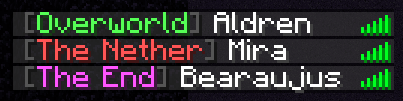
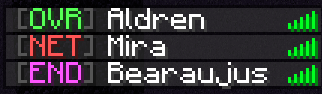
Tab Dimension Labels
Default:
Compacted:
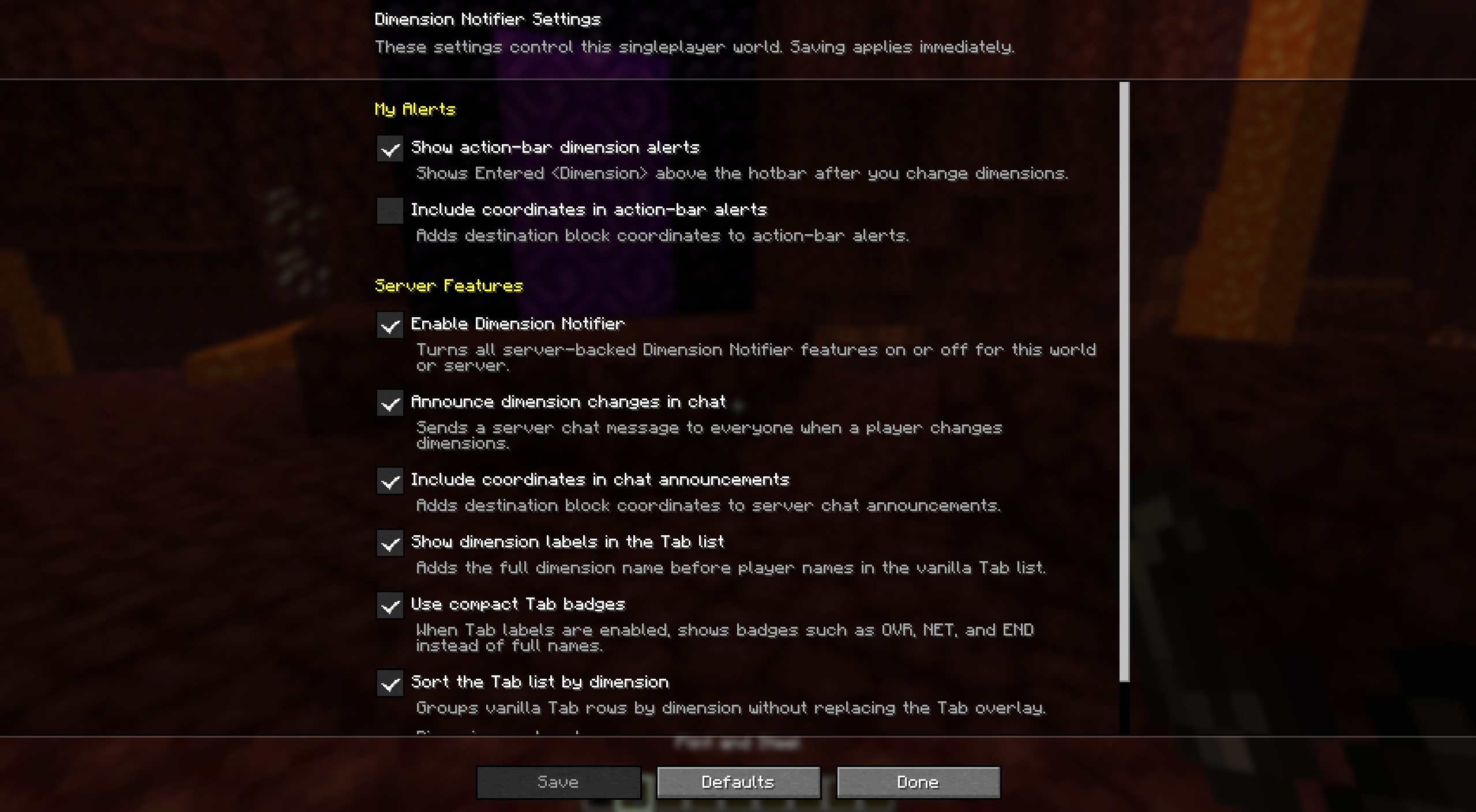
Mod Menu Settings
What is Mod Menu? You can check it here.
What Works Where
| Feature | Singleplayer | Multiplayer requirement | If only your client has the mod |
|---|---|---|---|
| Action-bar Alert | Works locally when you change dimensions. | Server install covers vanilla clients. Client install lets that player control local alert settings. | Works for you only. |
| Chat Announcements | Works in the integrated server. | Requires the server to run the mod. Everyone sees the server message. | Not available. |
| Tab Dimension Labels | Works in the integrated server. | Requires the server to run the mod. Everyone sees dimension labels in Tab. | Not available. |
| Mod Menu Settings | Editable when Mod Menu is installed. | Local alerts are editable. Server features are read-only on remote servers. | Local alert settings only. |
Config
After first launch, edit:
config/dimension-notifier.properties
Default config:
# Master toggle for server-backed Dimension Notifier features.
enabled=true

# Shows "Entered <Dimension>" above the hotbar when a player changes dimensions.
action_bar_notifications=true

# Adds destination block coordinates to action-bar alerts.
action_bar_coordinates=false

# Sends a server chat message when a player changes dimensions.
broadcast_dimension_changes=true

# Adds destination block coordinates to server chat announcements.
broadcast_dimension_change_coordinates=true

# Adds the current dimension before each name in the vanilla Tab list.
tab_list_dimension_labels=true

# Uses compact badges such as OVR, NET, and END instead of full dimension names.
tab_list_compact_dimension_labels=false

# Groups vanilla Tab rows by dimension.
tab_list_dimension_sorting=true

# Controls top-to-bottom Tab grouping order. Unlisted dimensions sort after this list.
tab_list_dimension_order=minecraft:overworld,minecraft:the_nether,minecraft:the_end
File edits require a game or server restart. Mod Menu changes apply immediately where editable. On remote multiplayer servers, server features are controlled by the server and appear read-only.
Support and License
Report issues at minecraft-addons.
Dimension Notifier is distributed under the Bearaujus Proprietary License v1.0.
Dimension Notifier is not official Minecraft content and is not approved by or associated with Mojang or Microsoft.